Android
Get the Teacher's Assistant app
Install the same Schoolio experience on your phone. Scan the QR code or tap download. Sign in with the same account you use on the web.
Scan to download

Download URL
http://hodostechnologies.com/download/schoolio-android.apk
Install instructions (Android)
- Tap Download Android app (.apk) and wait for download to finish.
- Open the APK from Notifications or your Downloads folder.
- If Android asks for permission, enable Allow from this source for your browser/files app.
- When Google Play Protect shows App scan recommended, tap Scan app.
- After scan completes, continue install and open Schoolio.
- Sign in using the same account you use on web.
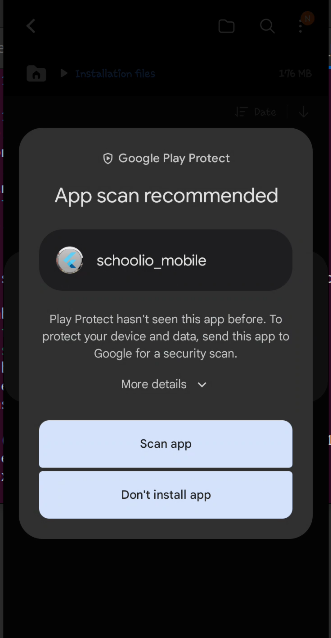
This Play Protect screen is common for direct APK installs while apps are not yet distributed through Google Play.
Troubleshooting
-
Download does not start
Check internet connection, then try again in Chrome. If using private mode, switch to normal browsing.
-
Install button is disabled
Enable Allow from this source for the browser or file manager you used to open the APK.
-
App not installed / parsing error
Delete the APK, re-download fully, and ensure your Android version supports the current Schoolio release.
-
Play Protect keeps warning
Tap Scan app and wait for result. This warning is expected for direct APK installs outside Play Store.
-
Still stuck?
Open the web app and contact support via Contact page with your phone model and Android version.